Claude Code Now Has an Official Plugin Marketplace – Here’s Why That Matters

  • AI
Introduction

If you’ve been following how AI coding tools have evolved over the past couple of years, something quietly significant happened recently that’s worth paying attention to.

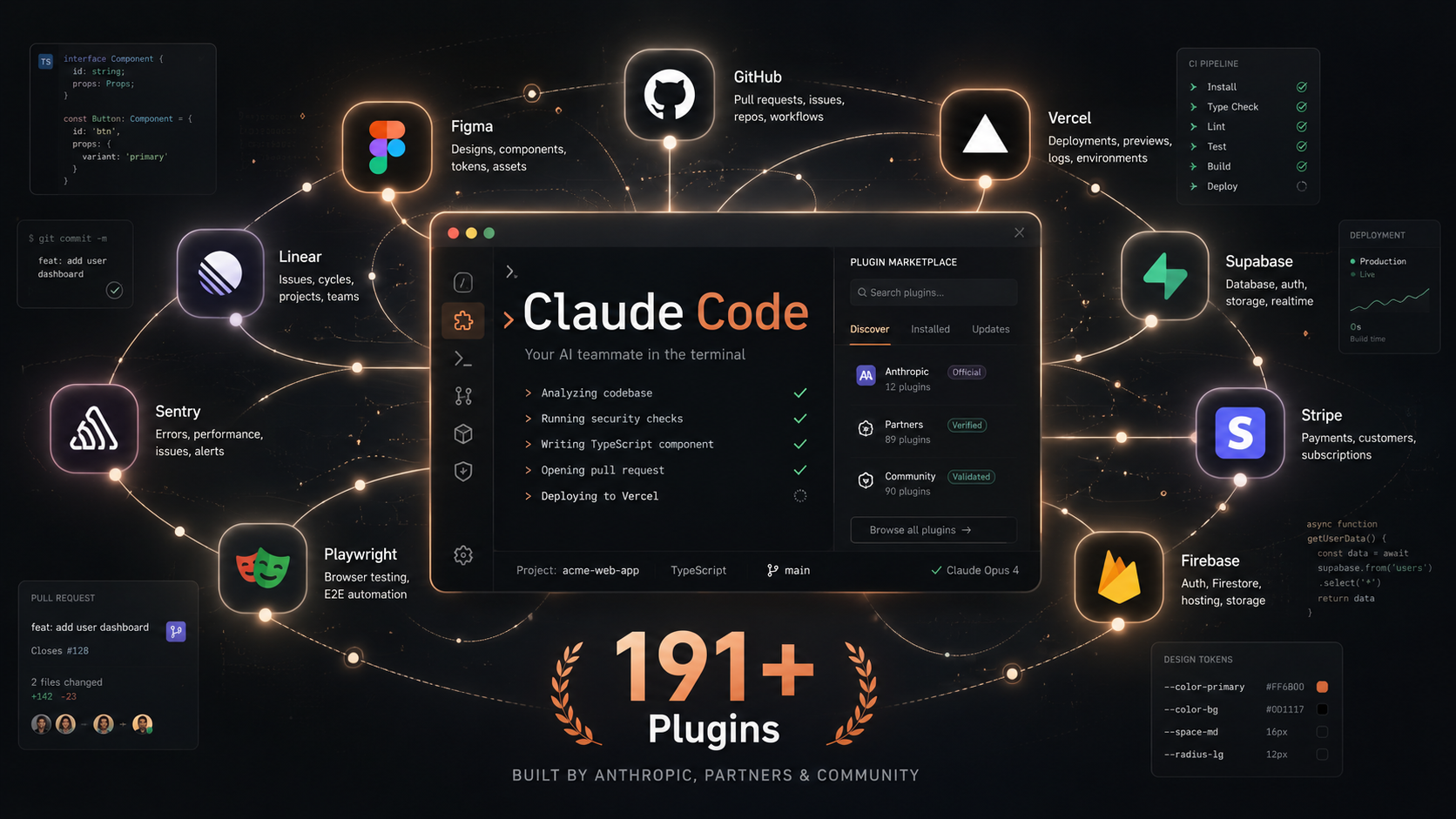
Anthropic – the company behind Claude – launched an official plugin marketplace for Claude Code, their AI-powered coding tool. It’s now up to 191 plugins and growing. On the surface, it sounds like a developer convenience feature. But what it actually represents is something more interesting: Claude Code is on its way to becoming a platform, not just a tool.

Here’s what’s going on and why development teams should pay attention:

What Is Claude Code, Briefly

Claude Code is an AI coding assistant that lives in your terminal. It reads your codebase, understands the context of your project, and helps developers write code, debug problems, handle git workflows, and execute multi-step tasks – all through natural language.

Think of it less like an autocomplete tool and more like a technically capable collaborator that can look at your entire project, understand what you’re building, and take meaningful action on it.

It’s been gaining serious traction among development teams this year – and the plugin marketplace is the next logical step in making it genuinely customisable.

What the Plugin Marketplace Actually Is

The official marketplace is maintained directly by Anthropic. It is built into Claude Code by default. You don’t need to add it manually. Run /plugin inside Claude Code, head to the Discover tab, and everything available is right there.

As of this week it has 191 plugins across three categories:

Anthropic-built plugins – developed and maintained internally by the Anthropic team. These cover language servers for TypeScript, Python, Rust, Go, Java, PHP, and more, giving Claude real-time awareness of type errors, missing imports, and code navigation within your project. There are also workflow plugins for code review, feature development, commit management, and security guidance.

Partner plugins – integrations built by external companies and vetted for inclusion in the official marketplace. This includes Figma, GitHub, Vercel, Supabase, Linear, Sentry, Stripe, Firebase, and Playwright, among others. These connect Claude Code directly to the tools development teams already use.

Community plugins – third-party plugins that have passed Anthropic’s automated validation and safety checks, pinned to specific commit versions for stability.

Beyond the official marketplace, there’s also a community marketplace and the ability for teams to build and share their own private plugin collections – useful for encoding internal workflows, style guides, or project-specific knowledge directly into how Claude behaves.

Why This Is More Than Just a Feature Update

The interesting thing about a plugin marketplace isn’t the plugins themselves – it’s what the existence of one signals.

When a tool gets a plugin ecosystem, it stops being a single product and starts becoming a platform. VS Code did this. JetBrains did this. Once a tool can be extended, configured, and distributed across teams with consistent behaviour, it moves from “something individual developers use” to “something organisations adopt.”

That’s what’s happening with Claude Code right now.

A few things follow from this that are worth thinking about:

Development workflows are becoming codifiable. Plugins let teams package their own best practices – how they handle code review, how they structure commits, how they approach security – and make those repeatable across every developer on the project. That kind of consistency used to require documentation and discipline. Now it can be built directly into the tool.

The barrier between design and development keeps shrinking. The Figma plugin for Claude Code lets developers pull design context, components, and tokens directly into their coding environment. A developer working on a client’s website can reference the Figma file in natural language without switching tools. For agencies working across design and development simultaneously, this kind of integration matters.

Context awareness is improving dramatically. One of the genuine limitations of AI coding tools has been that they often lack deep project context – they know general patterns but not your specific codebase. Plugins like the codebase analysis tool, which examines your project and recommends tailored automations, address this directly. The more Claude understands about a specific project, the more useful it becomes.

What This Looks Like in Practice

To make this concrete – a development team working on a web application in 2026 might have Claude Code configured with:

A TypeScript language server so Claude catches type errors in real time as it writes or edits files. A GitHub plugin so it can open pull requests, reference issues, and manage branches without leaving the terminal. A Vercel integration to check deployment status and logs. A Figma plugin to pull the latest component specs from the design file. A custom internal plugin encoding the team’s preferred code review checklist and commit structure.

The result is an AI collaborator that doesn’t just know TypeScript – it knows this project, these tools, these workflows, and these standards. That’s a meaningfully different proposition from a general-purpose coding assistant.

A Note on Trust

Anthropic’s own documentation is clear: plugins are highly trusted components that can execute code on your machine. The official marketplace is curated and vetted. The community marketplace is validated but less controlled. Anything outside those two tiers should be treated the same way you’d treat any third-party code – with appropriate scrutiny.

For teams working on production systems or client projects, sticking to official and well-maintained partner plugins is the sensible approach. The ecosystem is young, and quality will vary.

The Webster Solutions Perspective

At Webster Solutions, we pay close attention to how development tooling evolves – because the tools we use directly affect the quality, speed, and consistency of what we build for clients.

The Claude Code plugin marketplace is early but genuinely interesting. The direction it’s heading – a configurable, context-aware AI development platform rather than a generic assistant – aligns with how serious development work actually gets done. Projects have specific stacks, specific standards, and specific integrations. Tools that can be shaped around those specifics will outperform generic ones.

We’re exploring how plugins like the Figma integration and codebase analysis tools fit into our workflow, If you’re a developer or leading a development team and haven’t looked at Claude Code recently, it’s worth revisiting. The ecosystem around it has grown considerably in a short time.

👉 Ready to work with a team that stays ahead of the curve? Book a free strategy call with us – let’s talk about your next project!


administrator